
1. Connect to the monitoring platform, and select the relevant site and access the admin tab.
2. Select the Site Access tab:
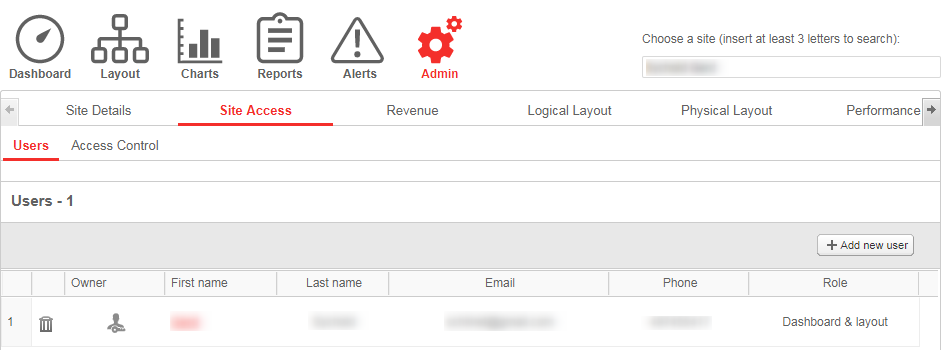
3. Click Add new user, then the following form is displayed:
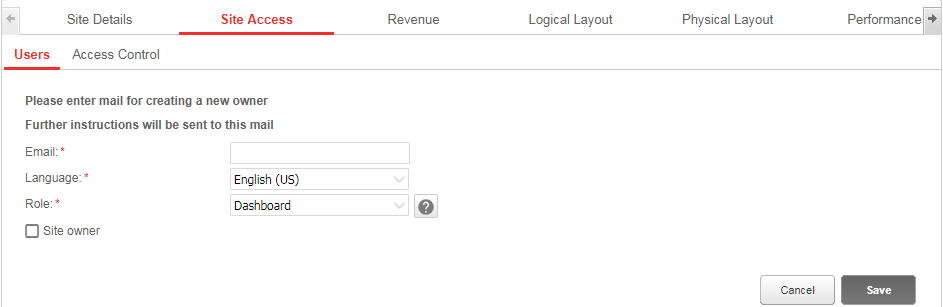
4. Enter the owner’s e-mail address.
5. Select the monitoring portal display language for the new owner.
6. Select the new owner’s role. You can see the differences between each role by clicking the  .
.
7. Upon completion, click Save. An email will be sent instructing the owner(s) how to access and register to the SolarEdge monitoring portal.
Comments
1 comment
Step 2 actually has changed - please update!
Please sign in to leave a comment.